Initial look
Running what_password doesn't print a prompt. It just waits for input, then prints Incorrect password! if the guess is wrong.

I opened the binary in Binary Ninja and jumped to main. It's a 64-bit x86 ELF, and the symbols haven't been stripped, so there isn't much hunting around to do.
- file
- what_password
- format
- ELF64 / x86-64
- analysis tool
- Binary Ninja
- original crackme
- View on crackmes.one
- main
- 0x401150
- original SHA-256
- f27ca3167737d987db891fdf33b2fb758db0c9b4240040617f7dc66fa7cccc44
The password check
main starts by reading up to 0x400 bytes from stdin into input.
After that, r14 is initialized to 0 and r15 to 2. In the loop, r14 is the index into the password data and r15 is a value added to each decoded byte.
Each byte from pw is XORed with 0x27, then the current increment is added. The result is compared against the corresponding byte from our input.
In simplified form, the check looks like this:
read(0, input, 0x400);

index = 0;
increment = 2;

while (true) {
    expected = ((pw[index] ^ 0x27) + increment) & 0xff;

    if (expected != input[index])
        fail();

    if (expected == '\n')
        success();

    index++;
    increment += 2;
}
So there's no need to brute-force anything. The binary already contains everything needed to reconstruct the expected input.
Recovering the password
pw starts at 0x404028:
4e 49 1d 42 7c 41 7c 33 75 6a 6b 3c 7e 7f cbI copied the transformation into a short Python script:
stored_bytes = bytes.fromhex(
    "4e 49 1d 42 7c 41 7c 33 75 6a 6b 3c 7e 7f cb"
)

password = bytearray()
increment = 2

for stored_byte in stored_bytes:
    expected = ((stored_byte ^ 0x27) + increment) & 0xff
    password.append(expected)

    if expected == 0x0a:
        break

    increment += 2

print(bytes(password))
Which gives:
b'kr@meri$dab3st\n'The final \n is the newline from pressing Enter, so the actual password is:
kr@meri$dab3st
Skipping the check instead
Recovering the password is one way to solve it. The easier way, if all you care about is reaching the success path, is to patch the conditional branch.
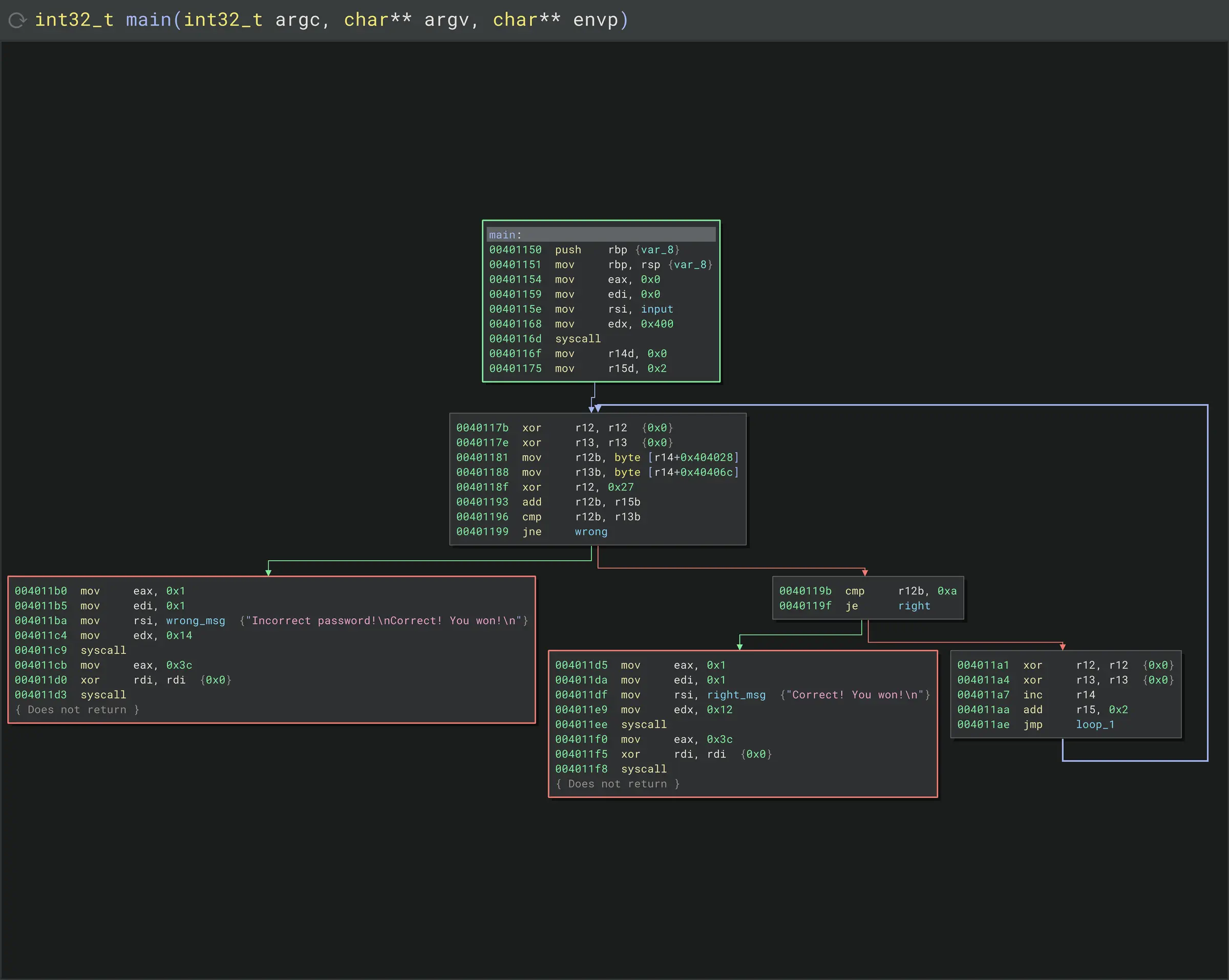
The relevant instructions are:
cmp r12b, r13b
jne wrong
cmp r12b, 0x0a
je right
At 0x401199, the jne 0x4011b0 sends execution to the failure path when the bytes don't match.
I replaced it with an unconditional jump to the success block at 0x4011d5:
cmp r12b, r13b
jmp right
nop
The original conditional jump was only two bytes, while the replacement jmp is five, so Binary Ninja overwrote the following bytes as well and padded the remainder with a nop.
- patch address
- 0x401199
- original bytes
- 75 15 41 80 fc 0a
- patched bytes
- e9 37 00 00 00 90
- patched SHA-256
- 80dee3bc87b9cd5d04365041ee75be717cd3461c68f909f8cb766a9136941a30
With that patch in place, the comparison no longer matters. Any input reaches the Correct! You won! branch.
